Setting Up SEPA with Structure Address

Before proceeding, please ensure you are using the latest version of SFM.
New EU SEPA regulations require a structured Address in the SEPA File. If you're on the latest SFM update, All Banks SEPA file will automatically be generated in the structured address format.
Required Configuration for Structured Address SEPA Files
When generating a SEPA file, you may encounter an error if Company Information is missing.
To resolve this:
- Navigate to Support > Bank Account Details.
- Select your Bank account and go to the Details tab.
- Click Edit.
- In the "Additional Company Info" section, enter the Company Town and Country, these are now mandatory fields required by the Bank.
Supplier Address Requirements
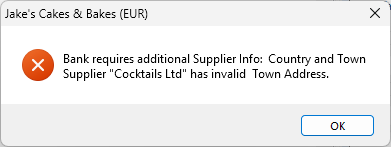
The bank also requires that each supplier’s Country Code is provided. If this information is missing, the system will prompt you to update it when generating SEPA files.
To update supplier address details:
- Go to Current Year > Utilities > Company Maintenance > Purchases Details tab.
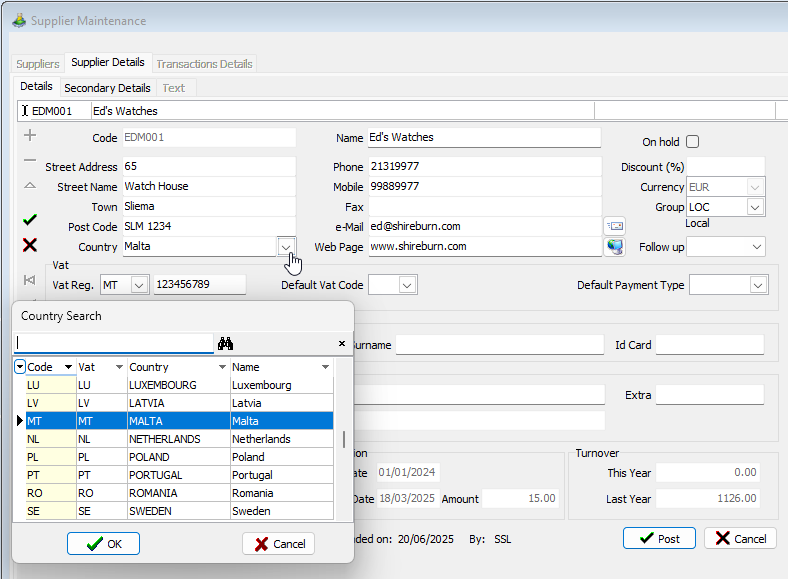
- Update the Address fields to include the Town and Country as per below:

While the Town and Country can be entered in any of the address fields, make sure to clearly label the fields as ‘Town’ and ‘Country’ for clarity and compliance.
The Country field in supplier addresses will automatically reference the updated Country Support File located at Support > Countries.
When generating a SEPA file, the system will notify you if any supplier is missing Town or Country information.

You can update supplier details in bulk using the Export/Import functionality.